Import products
- Go to Dashboard -> Products -> Catalog.
- Click Manage Catalog in the upper right-hand corner. Then, select Import products from the dropdown.
- Download the Catalog CSV template by clicking sample CSV template.
- Match your product details to the Zonos CSV template fields. Do this by using the table below to ensure you are using the correct values and information in the most fitting fields.
- For fields/columns you do not use, just leave them blank. You can also delete them, but that is not necessary.
- Save your file as a CSV.
- Upload your new CSV file to Catalog by dragging and dropping your file or by clicking browse to find and select your file. Note that the maximum file size for Catalog upload is 50 MB.
- Follow the prompts to review your uploaded products and correct fields if there are any errors.
- Click Import.
Field requirements
Only one field is required to import a product: a SKU or a product ID, depending on your item key preference. Every other column can be left blank.
However, the more product details you provide, the better your results. Complete product data improves landed cost accuracy, HS code classification, and customs clearance, and it reduces the chance of delays or unexpected charges for your customers. We recommend filling out every field you have data for, even though only an identifier is required.
Conditionally required fields
Some fields are optional on their own, but become required as soon as you use a related field.
| If you provide↕ | You must also provide↕ |
|---|---|
| Weight | Weight unit |
| Weight unit | Weight |
| Length, width, or height | All three dimensions and a dimensional unit |
| Dimensional unit | Length, width, and height |
| Price | Currency |
| Volume or alcohol by volume | Volume and volumetric unit |
| Country-specific HS code | The country it applies to, in Country code=HS code format |
Note: Weight defaults to
poundand dimensions default toinch, but those defaults only apply when you leave both the value and its unit blank. If you provide a weight or a dimension without its unit, the import fails.
Note: If you use inclusive pricing, a price and currency are required for every product, and the currency must match your organization's native currency.
CSV fields descriptions
The Required column indicates whether a field is required, optional, or conditionally required based on other fields you provide.
| Column↕ | Required↕ | Description↕ |
|---|---|---|
| SKU | Required* | The code that identifies the product within your business, e.g., GRLS-GRPHC-BBT-T-S |
| Product ID | Required* | Your product identifier, commonly the ID from your ecommerce platform, e.g., 254678901 |
| Name | Optional | The name of your product, e.g., Girls' graphic baby t-shirt |
| Description | Optional | The full detailed description of your product, e.g., Experience unparalleled comfort and sophistication with our Premium Polyester Shirt, meticulously crafted to enhance your wardrobe essentials. Designed with the modern individual in mind, this shirt boasts a sleek and versatile aesthetic, making it a perfect fit for both casual and formal settings. |
| Customs description | Optional | Concise product description for the commercial invoice. Character limit of 30, e.g., Girls' Shirt, 100% Polyester |
| Weight unit | Conditional | The product’s weight unit. If a unit is not provided, the value will default to pound. Valid values are gram, kilogram, pound, and ounce. |
| Weight | Conditional | The product’s weight. The weight value must be a positive number. |
| Dimensional unit | Conditional | The product’s dimensional unit. If a unit is not provided, the value will default to inch. Valid values are inch, foot, yard, millimeter, centimeter, and meter. |
| Length | Conditional | The length of the product. The length value must be a positive number. |
| Width | Conditional | The width of the product. The width value must be a positive number. |
| Height | Conditional | The height of the product. The height value must be a positive number. |
| Packing preference | Optional | Whether or not your product ships alone ships_alone or can be consolidated. If your product can be consolidated with other products at shipment (most common), you can leave this field blank. |
| Restricted countries | Optional | Restrict your product from certain countries. Values are 2-digit ISO codes separated by a vertical bar. If you’d like to restrict all countries, input ALL. If you’d like to restrict to all countries except for one or a few, input ALL- the countries you’d like to unrestrict separated by vertical bars, e.g., ALL-CA|AU|US. If you’d only like to restrict to specific countries, input the countries you'd like to restrict separated by vertical bars, e.g., AU|KR|MY|SG. If you'd like to remove all existing restricted countries, input NONE as the value. |
| Product type | Optional | Determines the nature of the product. The values for this are physical_good, digital_good, service, subscription, bundle and partial_item. If your product is a physical good (most common), you can leave this field blank. |
| Country of origin | Optional | The country the product was manufactured in. Values are 2-digit ISO codes, e.g., JP, GB, KR. |
| Universal HS code | Optional | The product’s universal, 6-digit HS code, e.g., 9506.62 |
| Country-specific HS codes | Optional | The product's country-specific HS codes, separated by vertical bars when there are multiple country-specific codes, e.g., IT=6109.10.0010|DE=6109.10.0010|GB=6109.10.0010|JP=6109.10.020 |
| Image URL | Optional | The image URL for the product, e.g., https://www.exampleclothingstore.com/images/girls-graphic-baby-tee-pink-unicorn-001.jpg |
| Material | Optional | The main material or composition of your product, e.g., Polyester |
| Brand | Optional | The product’s brand, e.g., Nike |
| Price | Optional | The price you’re charging for the product. |
| Retail price | Optional | The original price of the product before discounts. Displaying it alongside the sale price highlights the savings for customers. The retail price must be higher than the base product price (above). |
| Currency | Conditional | The currency of the price. Values are 3-digit currency codes, e.g., USD, CAD, or AUD. |
*A SKU or a product ID is required, but you do not need both. Which one applies depends on your item key preference.
For alcoholic beverage merchants: If you're selling products under Chapter 22 of the Harmonized System (alcoholic beverages), additional measurement fields are required for excise duty calculations. See our excise duty documentation and use the specialized CSV template for these products.
| Column↕ | Required↕ | Description↕ |
|---|---|---|
| Volumetric unit | Required for alcoholic beverages | The unit of measure for volume. Valid values are milliliter, liter, fluid_ounce, etc. |
| Volume | Required for alcoholic beverages | The volume of the product, used for excise duty calculations. |
| Alcohol by volume | Required for alcoholic beverages | The alcohol percentage content. Value should be entered as a percentage, e.g., 12 for 12% ABV. |
CSV import errors
You might encounter errors when importing your catalog products. The following list describes import errors and how to resolve them. Once you resolve your errors, you can reimport your CSV.
Import errors
| Error↕ | Description↕ |
|---|---|
| File must be under 1 GB. | Your file is too big. The file must be under 1 GB. |
| File must be in CSV format. | Catalog only supports CSV-file format. To resolve this, ensure your file format is CSV. |
| Missing column header(s). | Catalog only supports files in the exact format of the Catalog template. Ensure your CSV headers match the headers of the CSV template file. |
| Unrecognized column header(s). | You have unrecognizable column headers. Catalog only supports headers in the exact format of the Catalog template. Remove unrecognized column headers, and double check that your CSV headers match the headers of the CSV template. |
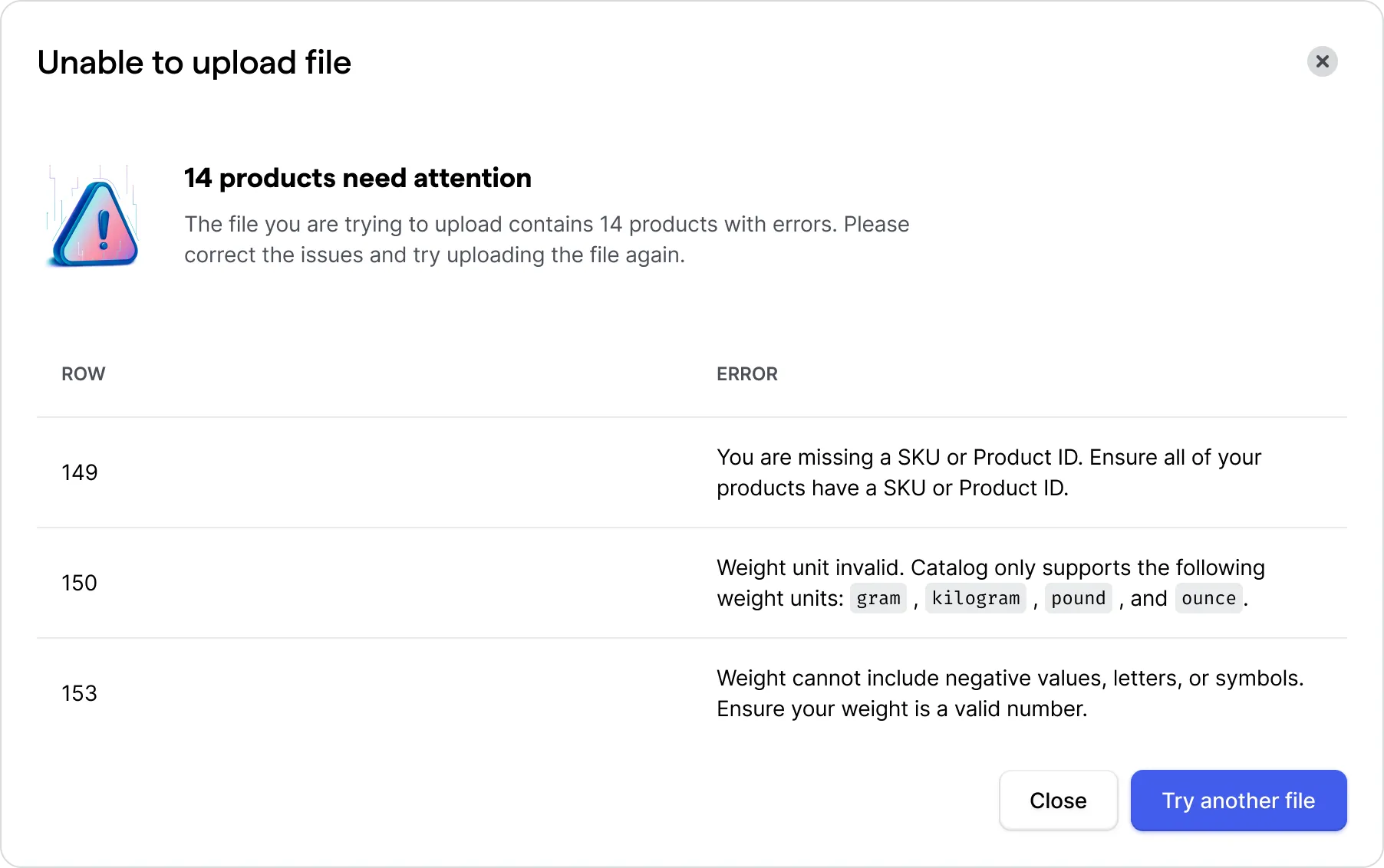
| You are missing a SKU or product ID. Ensure all of your products have a SKU or product ID. | An identifier (SKU/product ID) is required to create a catalog product. To resolve this, add a SKU or product ID for each product. |
| Customs description exceeds character limit of 30 characters. | By default, customs descriptions are limited to 30 characters, which aligns with the most common character limit for commercial invoices. |
| Product type invalid. | The values for this are physical_good, digital_good, service, subscription, bundle and partial_item. |
| Packing preference invalid. Catalog supports the following packing preferences: ships_alone and consolidated. If your product can be consolidated with other products, leave blank. | Packing preference invalid. Catalog supports the following packing preferences: ships_alone and consolidated. If your product can be consolidated with other products, you can leave it blank as consolidated is the default. |
| Weight unit invalid. Catalog only supports the following weight units: gram, kilogram, pound, and ounce. | Catalog only supports the following, unabbreviated units: gram, kilogram, pound, or ounce. |
| Weight must be greater than zero and cannot include letters or symbols. | Make sure your weight value is a valid, positive number without symbols or letters. Catalog supports weights with up to two decimal places, e.g., 5.85 |
| Dimensional unit invalid. Catalog supports the following dimensional units: inch, foot, yard, millimeter, centimeter, and meter. | Catalog only supports the following unabbreviated units: inch, foot, yard, millimeter, centimeter, or meter. |
| Length must be greater than zero and cannot include letters or symbols. | Make sure your length is a valid, positive number without symbols or letters. Catalog supports lengths with up to two decimal places, e.g., 5.29 |
| Width must be greater than zero and cannot include letters or symbols. | Make sure your width is a valid, positive number without symbols or letters. Catalog supports widths with up to two decimal places, e.g., 2.44 |
| Height must be greater than zero and cannot include letters or symbols. | Make sure your height is a valid, positive number without symbols or letters. Catalog supports heights with up to two decimal places, e.g., 8.02 |
| A weight unit is required when you provide a weight value. | Provide a weight unit for your products that have a weight value. Catalog supports the following weight units: gram, kilogram, pound, and ounce. |
| A dimensional unit is required if you provide dimensional values. | Provide a dimensional unit for your products that have a dimensional value. Catalog supports the following dimensional units: inch, foot, yard, millimeter, centimeter, and meter. |
| HS code must be between 6 and 16 characters. | HS code must be between 6 and 16 characters as universal HS codes are 6 digits and the longest country-specific HS code is 16 digits. |
| Country-specific HS codes must be in the format of 'Country code=HS Code` | Country-specific HS codes must be in the format of Country code=HS Code, e.g., KR=8518.30.9000. If there are multiple HS codes, separate each with a vertical bar, e.g., KR=8518.30.9000|CA=8518.30.9010. |
| [Country code] is not a valid country code. | Ship-to countries must be in ISO format, e.g., KR or BR. Make sure your ship-to countries are in 2-digit ISO format. |
| Country of origin values must be in ISO format. | Make sure your country of origin is in 2-digit ISO format. |
| Price cannot include negative values, letters, or symbols. | Make sure your price is a positive, valid value. Catalog supports prices with up to three decimal places, e.g., 104.399 |
| If you supply a price, a currency code is required. | Provide a currency code for your products that have a product price. |
| Currency codes must be in ISO format, e.g., AUD or THB. | Make sure your currency codes are in 3-digit ISO format. |
| If one dimensional field is provided, all three are required. | Make sure you have all three dimensional fields provided for products with dimensional values. |
Failed import example
Catalog CSV import
Bulk import your products to Catalog.Zonos Catalog's bulk import allows you to import your entire catalog at once. When filling out the Catalog CSV template, the only required field for each product is a SKU or product ID. If your file has duplicates of the same product based on the SKU and product ID, Catalog creates a product the first time, and then, if relevant, the product details will be updated with any new or supplementary information for the duplicated products.